How to Pack a TV for Moving (Without Damaging It)
Flat-screen TVs are some of the most fragile items in any household move. The screens are thin, the corners are vulnerable, and internal components can shift or crack with even minor bumps. Whether you're moving across town in Grand Island, Nebraska, or relocating to another part of Central Nebraska, packing your TV correctly is the difference between arriving safely and arriving with a cracked screen.
This guide walks you through exactly how to pack, transport, and unpack your TV so it survives the trip in perfect condition.
Why TVs Are So Easy to Damage During a Move
Modern flat-screen and OLED TVs look sturdy, but they're actually more delicate than the boxy tube TVs of the past. A few reasons TVs get damaged during moves:
- Pressure points: Even light pressure applied to the wrong spot on an LCD or OLED screen can cause permanent black spots or cracks.
- Temperature changes: Moving a TV from a hot moving truck into a cold house (or vice versa) can cause condensation to form on internal components.
- Improper positioning: Laying a TV flat or leaning it at an angle for too long can damage the panel.
- No original packaging: Most people don't keep the original box, which is specifically engineered to protect the screen.
If you've ever searched "how to move a TV without breaking it" or "best way to pack a flat screen TV for moving," you already know how common this problem is. Here's how to avoid it.
What You'll Need
Before you start, gather these supplies. Most are available at local hardware stores, moving supply retailers, or moving companies serving Grand Island and the surrounding Central Nebraska area.
- Original TV box and foam inserts (if you still have them)
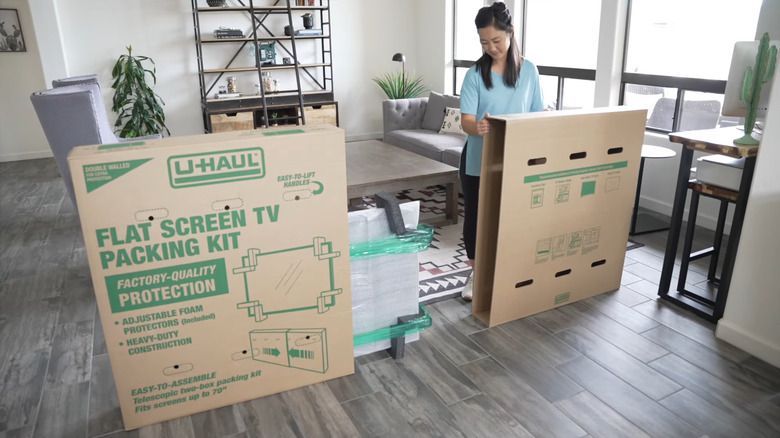
- TV moving box (a specialty box with adjustable sides, sold at moving supply stores)
- Bubble wrap or foam wrap
- Packing paper or moving blankets
- Painter's tape or packing tape
- Plastic wrap (stretch film)
- Zip-top bags for cables and screws
- A permanent marker for labeling
Step 1: Use the Original Box If You Have It
If you saved the box your TV came in, use it. The manufacturer designed that packaging specifically for your TV's size, weight, and screen type, with foam inserts positioned exactly where they're needed. This is always the safest option.
No original box? Don't worry — most moving supply stores in the Grand Island area carry adjustable TV moving boxes designed to fit a range of screen sizes.
Step 2: Disconnect and Photograph the Setup
Before you unplug anything:
- Take a photo of the back of your TV showing how all cables are connected.
- Unplug all cables, remotes, and accessories.
- Remove any wall-mount brackets if applicable.
- Place screws, cable ties, and small parts into a labeled zip-top bag and tape it to the back of the TV or pack it separately in a clearly marked box.
This one step saves enormous frustration when you're setting the TV back up in your new home.
Step 3: Protect the Screen First
The screen is the most fragile part of the TV, so it needs the first layer of protection.
- Cover the screen with a soft, anti-static material like a clean bedsheet, moving blanket, or the original foam sleeve if available.
- Avoid using plastic wrap directly against the screen, since it can trap moisture and cause static damage. Plastic wrap should only go over the outer padding, not directly on the panel.
- Tape bubble wrap (bubble-side in) around the entire TV, paying extra attention to the corners.
Step 4: Reinforce the Corners
TV corners take the brunt of impact during a move. Use extra padding, foam corner protectors, or thick folded moving blankets secured with tape at each corner. If you purchased a TV moving kit, it likely includes foam corner brackets — use them.
Step 5: Box It Up
Once the TV is wrapped:
- Place it upright inside the TV box or a sturdy cardboard box slightly larger than the TV itself.
- Fill any remaining gaps with packing paper or foam so the TV can't shift during transport.
- Seal the box with packing tape and label it clearly: "FRAGILE – TV – THIS SIDE UP."
Step 6: Transport It the Right Way
- Always keep the TV upright. Never lay a flat-screen TV flat during transport — this can cause internal panel damage.
- Secure it so it can't tip over. Wedge it between soft items in the moving truck, or strap it against a wall using moving straps.
- Keep it away from heavy items. Never stack boxes or furniture on top of or against a boxed TV.
- Watch the temperature. If you're moving during a Nebraska winter or a hot summer day, avoid leaving the TV in a freezing garage or a hot truck for extended periods. Let it acclimate to room temperature for a few hours before plugging it in at your new home.
Step 7: Unpack and Reconnect Carefully
At your new place in Grand Island or anywhere across Central Nebraska:
- Let the TV sit at room temperature for a couple of hours before turning it on, especially after a long-distance or cold-weather move.
- Unbox it carefully, avoiding any pressure on the screen.
- Reconnect cables using the photo you took in Step 2.
- Power it on and check for any visible damage before you consider the move complete.
Local Tip: Moving a TV in Grand Island and Central Nebraska
Local moves across Grand Island, Hastings, Kearney, and the wider Central Nebraska region come with their own considerations — gravel driveways, older homes with narrow staircases, and seasonal temperature swings that can affect how you handle electronics during transport. If you're moving in the fall or winter, plan extra acclimation time before plugging in your TV, and if you're using a moving truck without climate control, position the TV where it won't be exposed to direct sun or extreme cold for hours at a time.
When to Let the Professionals Handle It
Packing a TV yourself is completely doable with the right materials and a little patience. But if you have a large TV (65 inches or bigger), multiple electronics to move, or simply want peace of mind, hiring a professional moving company can save you time and reduce the risk of damage. Local movers who regularly serve Grand Island and Central Nebraska households often have TV-specific boxes and padding on hand, along with the experience to secure electronics properly for the ride.
Final Checklist Before You Move Your TV
- Original box or TV moving box ready
- Screen covered with soft padding (no direct plastic contact)
- Corners reinforced
- Cables, remotes, and screws bagged and labeled
- Box labeled "FRAGILE – TV – THIS SIDE UP"
- TV secured upright in the truck
- Acclimation time planned before reconnecting
Packing a TV correctly takes maybe 20 extra minutes — but it's 20 minutes that can save you hundreds of dollars in repair or replacement costs. Whether you're moving a few blocks in Grand Island or relocating across Central Nebraska, following these steps will help your TV arrive exactly the way it left: in one piece.